

Imunify360 License Nigeria | Server Antivirus + WAF Security - Nairahost

Linux Server Security Suite

Automated Malware Cleanup + WAF Protection for Hosting Servers

Imunify360 adds layered security to Linux web servers: malware scanning, automated cleanup, web application firewall, reputation monitoring, brute‑force protection, and proactive defense. Buy Imunify360 in Nigeria and get guidance for activation and best‑practice configuration.

Monthly License starts at
₦7,000 Monthly
Order Now View Pricing
WAF + Firewall Automated Cleanup Proactive Defense Reputation Monitoring Nigeria Support
Imunify360 Logo
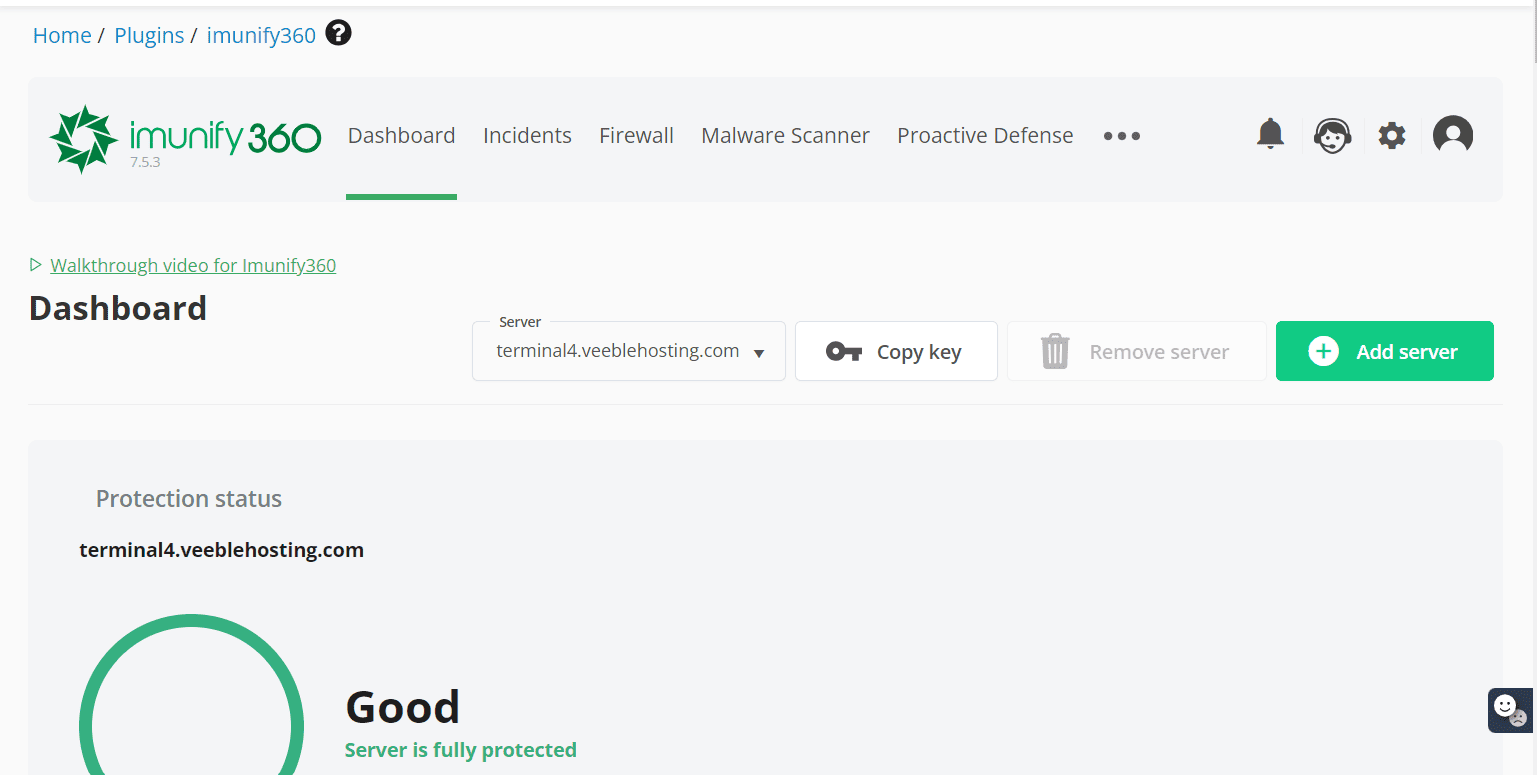
Imunify360 Dashboard
Server Protected
Security built for hosting
Always‑on
Scan
Find malware and web shells
Files and database scanning
Clean
Automate cleanup workflows
Reduce manual incident time
Block
WAF + proactive defense
Stop attacks before damage
Why Imunify360

Security That Works Automatically

Imunify360 is designed for real hosting environments where hundreds to thousands of websites share one server. It combines multiple layers of protection into one dashboard and helps reduce compromises, blacklisting, support tickets, and customer churn.

Web Application Firewall

Block malicious requests and common exploits targeting CMS, plugins, and vulnerable scripts. Add a strong layer between attackers and your applications.

Malware Scanner + Cleanup

Detect malicious files, injections, and web shells, then clean infections using automated workflows. Great for shared hosting and busy VPS environments.

Proactive Defense

Detect suspicious behavior at runtime and block unknown threats. This helps mitigate new attacks even before signatures are widely available.

Brute‑Force Protection

Reduce login attacks across common services and web applications. Control lockouts, watchlists, and suspicious behavior to reduce compromise risk.

Reputation & Blacklist Risk

Monitor threats that can lead to search engine warnings and security blocks. A cleaner hosting server protects your brand and customer trust.

Central Dashboard & Automation

Track incidents, scan schedules, and cleanup actions in one UI. Automate repetitive security tasks without daily micromanagement.

What It Protects

Threat Coverage for Real Hosting Workloads

On shared hosting, the most common incidents are caused by vulnerable plugins, stolen credentials, infected uploads, and malicious scripts. Imunify360 helps you reduce these risks with multiple layers of protection designed for multi‑tenant environments.

Web shells Defacements Spam scripts Phishing pages Brute‑force attacks File injections Backdoors Bot traffic Exploit attempts
Layer What it does
Malware Scanning Detect infected files and suspicious code patterns, then generate actionable reports for cleanup and remediation.
Automated Cleanup Help remove malware and restore safe versions of files where possible, reducing incident response time.
WAF Protection Block malicious HTTP requests targeting known vulnerabilities and common exploit techniques.
Proactive Defense Watch script behavior and stop suspicious actions, helping reduce new and unknown threats.
Brute‑Force Mitigation Detect and rate‑limit repeated login attempts across common services and applications.
Reputation Signals Support workflows that reduce blacklisting risk by keeping websites cleaner and limiting abuse.
Visual Overview

Imunify360 in Action

See how automated malware cleanup, proactive defense, and threat monitoring come together in one platform. Imunify360 keeps visibility high while reducing manual workload for hosting teams.

Server Protection Always-on threat detection
Threat Visibility Clear scan status
Guided Support Activation help
Always Online 24/7 protection layers
Imunify360 Admin Dashboard
Imunify360 Incidents Report
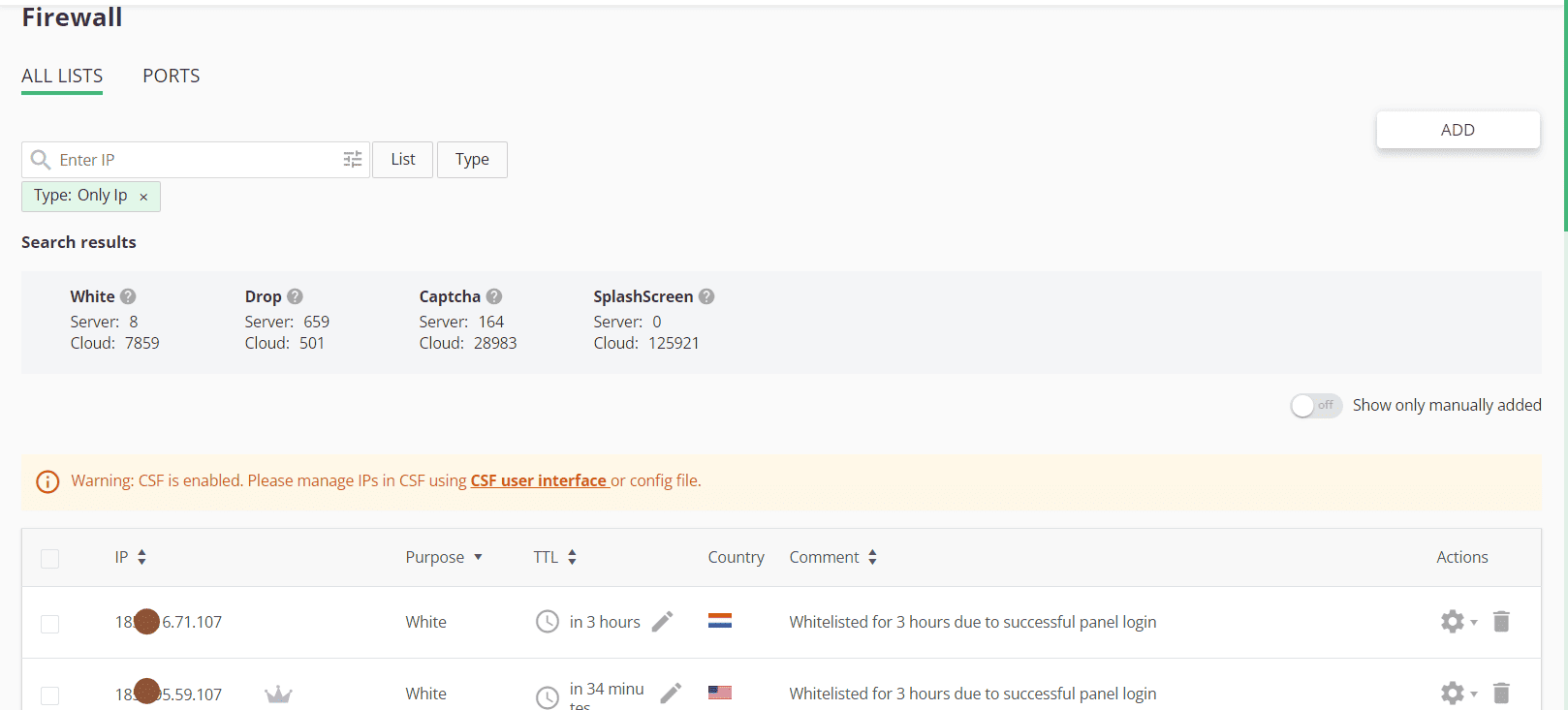
Imunify360 Firewall Management
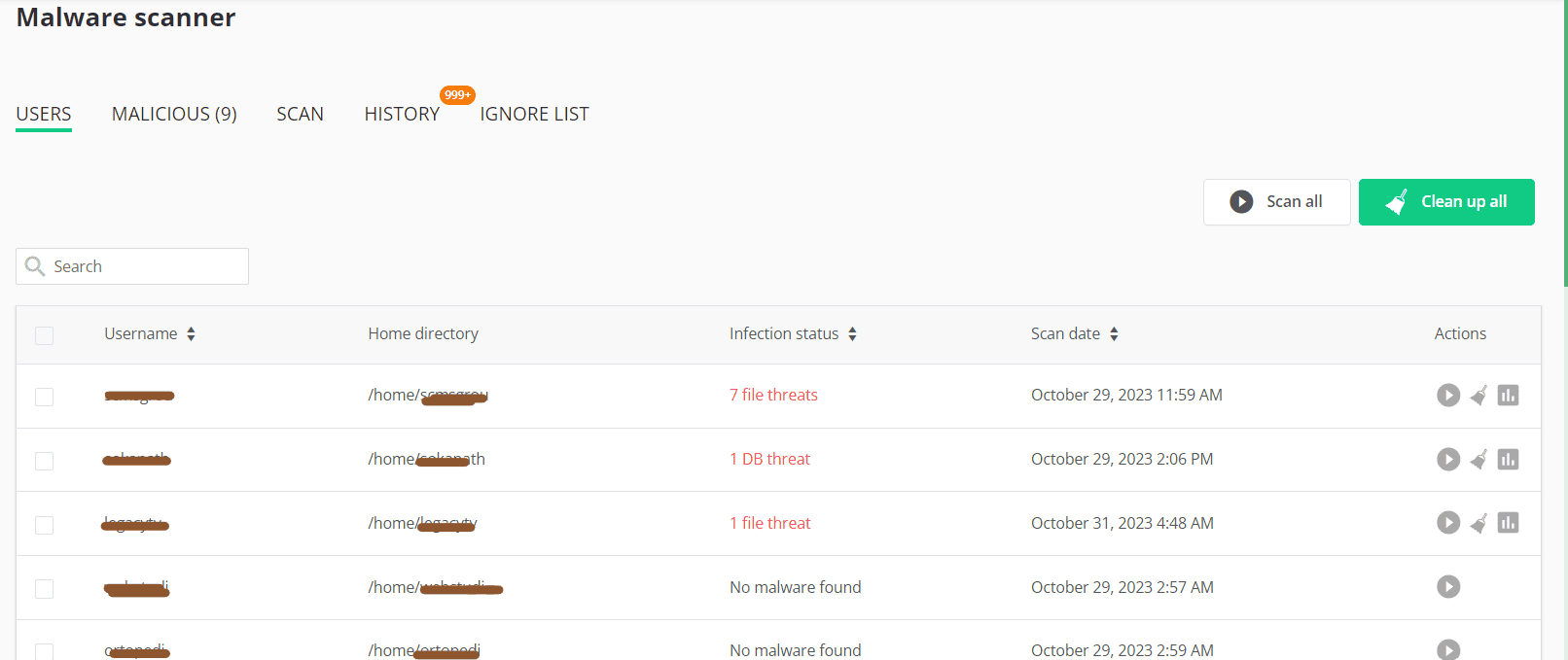
Imunify360 Malware Scanner
Activation

How to Activate Imunify360

Activation is straightforward. After purchase, you provide your server details, we confirm the order, and you install/enable Imunify360 on your Linux hosting server. Support is available to ensure the dashboard is reachable and scanning is running correctly.

1

Order the license

Checkout from the Server Add‑ons & Security store. Ensure your server is online and has a stable IP address.

2

Share your server details

After checkout, contact support with your server IP and environment details. We guide you on activation expectations.

3

Install & verify

Install Imunify360 and confirm the dashboard loads, scans run, and automatic protection is enabled for your workloads.

Best‑practice quick checklist

Use these steps to reduce false alerts, improve security posture, and keep performance stable on shared hosting servers and VPS nodes.
  • Keep OS packages and control panel updated
  • Enable scheduled malware scanning
  • Review WAF rules and exclusions responsibly
  • Use strong passwords and MFA where possible
  • Harden WordPress and common CMS installs
  • Monitor outgoing spam and abuse reports
  • Fix compromised accounts quickly to reduce reinfection
  • Document server changes for incident response
Pricing

Imunify360 License

One monthly license with fast ordering and support for activation and setup checks.

Need help with requirements or installation? Contact support after checkout.
Compatibility

Fits Common Hosting Stacks

Imunify360 is commonly used on Linux hosting servers. If you manage shared hosting, reseller hosting, VPS nodes, or dedicated servers, it can be part of a layered security approach that includes updates, backups, and good account hygiene.

Control Panels

Commonly used on servers running hosting control panels. If you manage cPanel or Plesk environments, Imunify360 can fit into routine maintenance and security workflows.

cPanel Plesk DirectAdmin

Web Servers

Works alongside popular web servers and hosting stacks. Pair with good caching and performance tuning to keep websites fast while staying secure.

Apache Nginx LiteSpeed

CMS Workloads

Most infections target WordPress and other CMS platforms through outdated plugins and weak credentials. Imunify360 helps reduce risk through scanning, blocking and response workflows.

WordPress Joomla Laravel apps

Shared Hosting

Reduce repeated infections and improve customer trust. Use layered protection plus good account isolation and backups for reliable multi‑tenant hosting.

VPS & Dedicated

Protect your own workloads and hosted clients. Combine with SSH hardening and good patch hygiene for a stable, secure server.

Agencies & Developers

Spend less time on emergency cleanups. Automated scanning and blocking helps keep client sites online while you focus on building and shipping.

Explore More

Other Licenses You May Need

Complete your server security and management stack with our other official licenses.

cPanel License

The industry standard for Linux web hosting management. Simplified and powerful.

View cPanel Plans
CloudLinux License

Improve server stability and density by isolating tenants and limiting resources.

View CloudLinux Plans
LiteSpeed License

High-performance web server for unbeatable speed and stability for your sites.

View LiteSpeed Plans
FAQ

Frequently Asked Questions

Answers for common questions about buying Imunify360 license in Nigeria, activation, requirements, and how it fits into security workflows for web hosting servers.

Imunify360 is a security suite for Linux web servers that combines malware scanning, automated cleanup workflows, WAF protection, brute-force mitigation, and monitoring in one dashboard.
Yes. Shared hosting environments often face repeat infections. Imunify360 is designed to help detect, block, and clean infections across many accounts with less manual effort.
It can detect many forms of malicious code such as web shells, backdoors, spam scripts, phishing pages, and suspicious injections in common website file structures.
Imunify360 can support automated cleanup workflows depending on configuration and the infection type. Always keep backups and review cleanup actions where necessary.
Yes. Imunify360 includes web-attack protection features typically referred to as WAF capabilities that can block malicious requests and reduce exploit attempts.
Proactive defense focuses on detecting suspicious behavior at runtime to help stop unknown or new threats. It complements signature-based detection and WAF rules.
No. Security and backups solve different problems. Backups help you recover quickly after incidents. Imunify360 helps reduce the chances of incidents and supports response workflows.
Keeping sites clean and reducing spam scripts lowers the risk of blacklisting. Combine security with patching, monitoring, and responsible mail sending to protect IP and domain reputation.
Any security scanning uses resources. With proper scheduling and configuration, most hosting servers run Imunify360 without major performance issues. Optimize scan frequency for your workload.
Order through our Server Add‑ons & Security store. After checkout, share your server details with support to confirm activation steps and verify your setup.
Yes. This page presents monthly pricing. Billing details follow the product listing in the store and your client area invoice terms.
No. Licenses are typically issued per server. If you manage multiple nodes, purchase one license per server and track them in your client area.
Not strictly. Many deployments are on control panel servers, but the best approach depends on your server environment. Share your setup with support and we will guide you.
It can help detect and mitigate common WordPress infections and attack patterns. The strongest results come from combining security with regular updates, least-privilege access, and safe plugin usage.
Yes. After purchase, contact support for activation guidance and basic verification checks to confirm scanning and protection features are running on your server.
Typically the server IP and basic environment details. Once the order is placed, we can guide you on what details are needed to complete activation smoothly.
Licenses are commonly tied to IP. If you migrate or your IP changes, contact support for guidance on updating activation details and keeping service continuity.
Yes. Most administrators schedule deeper scans during off-peak hours to minimize impact on website traffic. Choose a schedule that matches your server load patterns.
Keeping websites clean reduces spam scripts that can abuse mail systems. You should also apply mail‑sending limits and monitor abuse reports to protect IP reputation.
Yes. VPS owners and agencies use Imunify360 to reduce compromises and automate cleanup tasks. It is most effective when combined with updates, backups, and access hardening.
Installation typically requires administrator access. If you use managed services, your provider or admin team can perform installation and verification.
The WAF and proactive defense layers can help block exploit attempts. The most reliable fix is still patching: update plugins, themes, and CMS core regularly.
Many hosts use automated scanning and cleanup to reduce the number of compromised websites and repeated infections, which can lower time spent on emergency cleanups.
No security product can guarantee 100% prevention. Use layered security: patching, backups, access hardening, monitoring, and incident response procedures.
Activation is usually fast once checkout is complete and your server details are ready. If you need help verifying the installation, support can guide you.
If you migrate to a new server, contact support for guidance on updating licensing details. Plan migrations carefully and keep backups available.
Yes. Nigerian hosting providers and agencies face the same global threats: bots, plugin vulnerabilities, and infected uploads. Imunify360 helps automate security tasks while you focus on uptime and growth.
Yes. Your WHMCS client area generates invoices and receipts. You can download them anytime for accounting, audits, and business documentation.
Licenses are digital products. Once issued or activated, they are typically non-refundable. Confirm your requirements and server readiness before purchase.
Contact us from your client area after checkout. Provide your server details and we’ll help with licensing activation guidance and basic verification checks.

Ready to protect your hosting server?

Buy Imunify360 in Nigeria to reduce malware incidents and block attacks with layered protection. Order now and contact support for activation guidance.

Our Trusted Partners

We work with industry-leading companies to deliver the best services

Loading indicator for Nairahost web hosting services
WhatsApp chat support for Nairahost web hosting Nigeria Chat with us